
Quick answer: If you are comparing two badge printing kiosk quotes line by line, start with the print engine and the compute/thermal envelope. Those two determine the ceiling on check-in throughput and service life. The cabinet, the display and the reader set determine integration risk and your on-site labour cost. Lock those five first; treat networking, UPS and accessory lines as configuration variables you can price at the end.
The two BOM lines that decide everything else
If you are comparing two badge printing kiosk quotes line by line, start with the print engine and the compute/thermal envelope. Those two determine the ceiling on check-in throughput and service life. The cabinet, the display and the reader set determine integration risk and your on-site labour cost. Lock those five first; treat networking, UPS and accessory lines as configuration variables you can price at the end.
That ordering is the difference between a hardware quote you can audit and a shopping list. Most pages ranking for this topic compare pre-printed badges, staffed desktop printing and kiosk printing as workflows , then recommend a consumer printer or an iPad plus AirPrint. They never decompose the machine, so they never tell you which line item caps throughput. This page does the opposite: seven modules, each with a stated selection boundary, a named interface or physical constraint, and the exact question to put to a supplier.
Two sizing anchors before the detail. First, kiosk count: a published 2026 vendor comparison recommends six to ten kiosks as the primary method for a 1,500–5,000 attendee event, alongside pre-printed badges for VIPs and speakers and one staffed exception station (VenueSight, Event Badge Printing Options Compared , May 2026). Treat that as planning guidance, not a measured benchmark — the right number depends on your arrival curve, not headcount alone. Second, market context: the hardware segment was reported at USD 1.19 billion and 42.5% of the event badge printing kiosk market in 2025 (Dataintelo market report). That is a third-party estimate about a market, not a statement about any product.
The seven modules, in BOM order:
- Industrial PC (compute, OS image, port budget)
- Touch display (readability, cleaning regime, serviceability)
- Print engine and media handling (throughput and consumable cost)
- Scanner / ID reader (identity capture and exception flow)
- Contactless reader (badge encoding vs payment scope)
- Networking (print link and offline behaviour)
- Power input and UPS (peak draw and ride-through)
One rule governs the rest of this page: we do not publish print-head life, MTBF, jam rate, print speed, unit price or certification numbers for a badge-printing configuration until they are confirmed per project. Every such figure below becomes a documented question — with a test protocol attached — that you should put to any supplier, including us.
Modules 1–2: industrial PC and touch display — where integration risk is created
Industrial PC: the selection boundary is control, not CPU
The specification that matters is not the processor model. It is whether the supplier ships a locked OS image with driver support for the print engine, the scanner and the reader already validated, and how OS and security updates reach the kiosk after deployment. A fast board with an unlocked consumer OS image is the most common cause of a kiosk that works in the lab and fails in week three.
- Port budget. Count every physical port the final configuration consumes: print engine, scanner or ID reader, contactless reader, network, UPS telemetry. Then require at least one spare of each type. A kiosk that needs a USB hub at the venue is a field failure waiting to happen.
- Driver ownership in writing. Ask who is responsible when the print engine vendor releases a driver that breaks on the locked OS image. This is the single most common post-deployment dispute in integrated kiosks, and it is resolved on paper or not at all.
- Update path. Ask how a security patch is delivered to a fleet of eight kiosks three days before a show, and who signs it off.
Touch display: readability under venue light, not resolution
Resolution rarely causes complaints; glare, smudging and cleaning damage do. Ask for the measured brightness figure, the surface treatment (anti-glare versus glossy) and chemical resistance to the specific cleaning agent your operations team uses. Ask for the declared operating temperature window and compare it against your worst-case location — an unheated foyer, a marquee, a loading-dock check-in point. Our own figures for this configuration are pending confirmation and will be issued per project. Also ask one serviceability question that decides years of labour cost: can the display and PC be replaced without removing the cabinet from the floor?
Module 3: print engine — the module that caps throughput and drives consumable cost
Fix the media envelope first. Badge media width, maximum print width and supported thickness range determine whether you are locked to standard PVC, laminated stock or an eco substrate. Write those three numbers on the BOM line before you compare engines, because they constrain the rest of the design.
For the granularity to demand, look at how a European rental supplier publishes its event printer: direct thermal, 8 dots/mm (203 dpi), maximum media width 118 mm, maximum print width 108 mm, maximum speed 178 mm/s, USB and Ethernet, LCD display (pretix hardware specification, 2026). That is a third-party spec sheet for a different product — quote it as a format example, not as our capability.
- Resolution decision. 203 dpi versus 300 dpi is a badge-design decision (photo fidelity, small QR modules, security overlays) and a consumable-cost decision. Ask both suppliers to quote the same media at both resolutions so the delta is visible on the page.
- Never accept a print-speed headline. Require seconds-per-badge measured with a stated media type, resolution, coverage ratio and ambient temperature, plus a continuous-run figure covering the length of your peak hour. A single-badge sprint number tells you nothing about queue behaviour at 08:40.
- Reload time is a staffing line. Ask for media capacity per roll and the reload interval, then multiply reload time by kiosk count. That product is your hidden labour cost for the event.
- Stock handling. Confirm the feeder tolerates the pre-perforated or pre-slotted stock your badge design uses, and the full thickness range it accepts.
Park these as supplier-evidence items rather than marketing copy: print-head life, jam rate, MTBF and spare-parts lead time. If a supplier will not attach test conditions to a number, the number does not belong in your BOM.
Modules 4–5: scanner / ID reader and contactless reader — identity, compliance and exception handling
Scanner: symbology coverage plus tolerance
The boundary is not “reads QR codes.” It is decode success rate at a stated screen brightness and a stated distance, because attendees present phones at every angle and every brightness level. Ask for that as a test protocol — screen type, luminance, distance range, angle — rather than a success-rate claim. An image-based scanner with adjustable illumination is usually easier to validate than a laser unit for phone screens; ask the supplier to state which it is supplying.
A document or ID reader changes more than the BOM line: it changes cabinet cut-outs, port budget, privacy handling and data retention. Decide now whether identity verification is in phase one. Deferring it is legitimate, but record it as a named retrofit line with the cut-out and port reserved, or you will pay for a cabinet revision later.
Contactless reader: specify which protocol the kiosk must speak
MIFARE/NFC badge encoding and payment acceptance are different projects, not interchangeable reader lines. A payment-capable configuration moves the deployment into payment-card security scope, which is a separate review from badge encoding. For EU deployments, add the data-handling questions that US-only suppliers tend to answer vaguely: what is captured, where it is stored on the kiosk, how long it is retained, and whether the reader can run in template-only mode. Ask each supplier to distinguish reader models that are pre-integrated and driver-supported from those “supported with custom work” — unbundled drivers are the usual source of integration slippage.
Modules 6–7: networking and power + UPS — the two lines that decide whether the kiosk survives show day
Print link
Prefer a wired print path where the floor plan allows it. VenueSight’s 2026 comparison notes that USB is the most reliable event print connection, Ethernet is a good middle ground for fixed kiosk installations, and Wi-Fi introduces a failure point — a sensible default to argue at design review. For the network line itself: wired Ethernet as primary, a documented fallback such as an LTE router, static configuration rather than captive-portal dependence, and a test on the same network type as the venue before deployment day.
Then ask the offline question. Require the supplier to state, in writing, what the kiosk does when the registration API or the network drops: queue-and-print with local cache, print from a cached attendee list, or fail closed. And how the staffed exception station recovers that attendee. The throughput benefit of self-service is real, but only when the exception path is designed rather than improvised.
Power and UPS
- Peak, not idle. Ask for input voltage range, typical draw and peak draw measured with the print engine mid-cycle. Peak is what trips a shared circuit.
- Connector by market. Specify the plug and inlet type per destination market on the BOM, not at the shipping stage.
- UPS sizing boundary. Ride-through time for one badge cycle plus a safe shutdown — not minutes of runtime. Require the documented shutdown behaviour and the telemetry or reporting path.
- Thermal design. Ask whether the cabinet’s airflow assumes the printer and PC share an air path, and request the vendor’s stated ambient operating window. Our own figure for this configuration is pending confirmation.
The printable BOM table: seven lines, four columns
Hand this to procurement as-is. The fourth column keeps unverified numbers out of the purchase order.
| Module and function | Locked spec / selection boundary | Data the supplier must supply (with test conditions) | Lock now or retrofit |
|---|---|---|---|
| 1. Industrial PC | Locked OS image; one spare port per type | Driver/firmware compatibility matrix; update delivery method | Lock now |
| 2. Touch display | Measured brightness; cleaning-agent resistance; front-serviceable | Declared ambient operating window; surface treatment | Lock now |
| 3. Print engine + media | Media width, print width, thickness range, resolution | Seconds-per-badge at stated media/resolution/coverage/temperature; continuous-run figure; reload interval; head life and jam rate with conditions | Lock now |
| 4. Scanner / ID reader | Symbology set; read distance and illumination tolerance | Decode success protocol (screen type, luminance, distance, angle) | Lock now (reader) / retrofit (ID reader) |
| 5. Contactless reader | Protocol: badge encoding or payment — not both by default | Pre-integrated and driver-supported model list; data retention and template-only mode | Lock scope now |
| 6. Networking | Wired primary plus documented fallback; static config | Offline behaviour and exception-station recovery path | Lock now |
| 7. Power + UPS | Peak draw with print engine mid-cycle; ride-through for one badge cycle | Voltage range; shutdown behaviour; UPS telemetry path | Lock now |
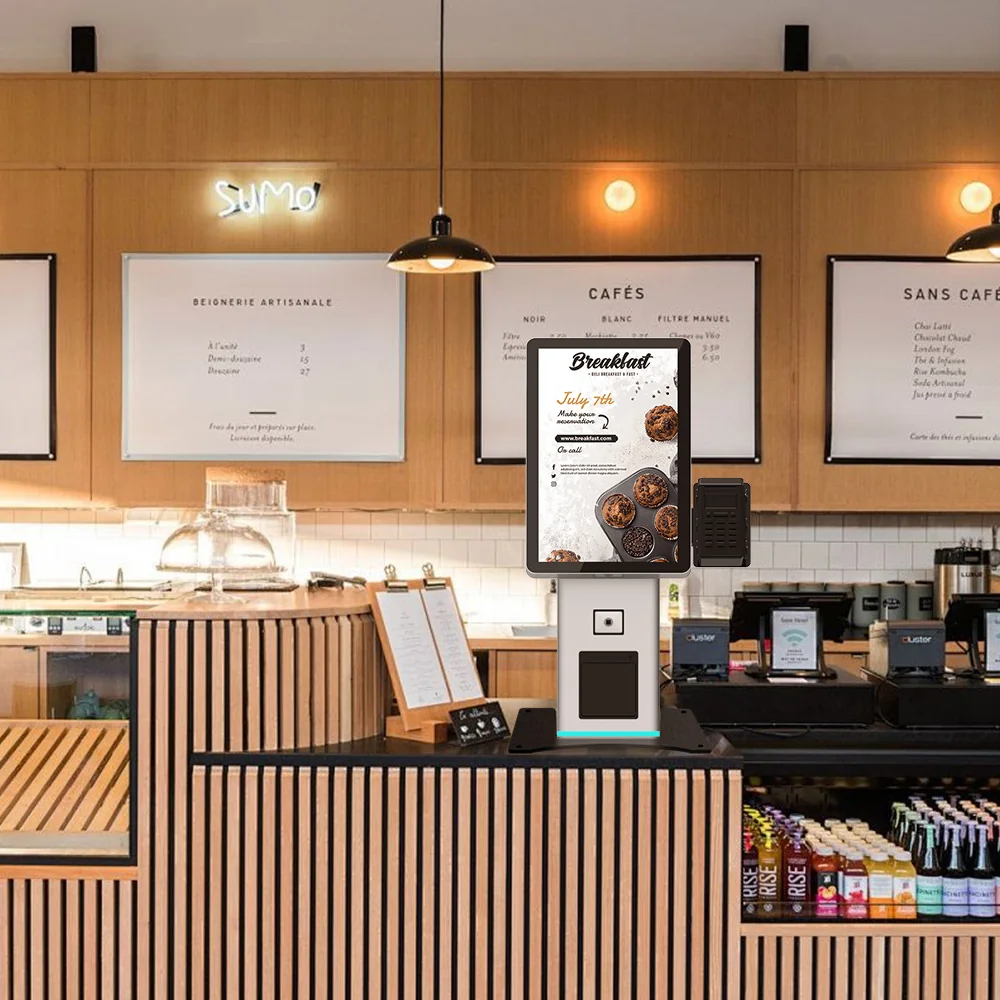
Footer note for the table: enclosure, cut-outs, service access and branding are supplied by the cabinet platform, not by a separate module. That is what keeps this seven-line BOM stable across regions — mount the same module set onto a US-K215CB freestanding kiosk cabinet platform for a floor-standing deployment, or onto the US-K156 compact kiosk platform where floor space at the registration desk is the binding constraint. These are cabinet and integration platforms, not badge-kiosk models; the badge-printing module set is configured onto them.
Evidence to demand before you sign — and what we will not claim
Request five documents: a driver and firmware compatibility matrix for the locked OS image; measured print throughput on your media and resolution; a port and power budget with peak draw; a declared ambient operating window; and spare-parts plus consumable lead times. Add the exception-flow design — how an attendee with a failed scan, a duplicate registration or out-of-range badge stock reaches a staffed station.
Be skeptical of headline ROI percentages. Third-party figures exist and are worth reading with their scope attached: a 2025 Micepad study on event check-in, as reported by Event Passport PRO in 2026, cites a 73% reduction in average check-in time versus manual paper-based check-in, translating to roughly 15–30 seconds per attendee at peak, and up to 60% less pre-event badge waste. Those are vendor-published figures about workflows, not measurements of any specific kiosk configuration — and they tell you nothing about which print engine you should buy.
For this configuration, our own module specifications, service-life figures and certification scope are pending confirmation and will be issued per project. We would rather hand you the test protocol than a number you cannot audit.
FAQ
How many badge printing kiosks do I need for a 5,000-attendee event?
Published guidance puts six to ten kiosks as the primary method for the 1,500–5,000 attendee band, with pre-printed badges for VIPs and speakers and one staffed exception station (VenueSight, 2026). Use that as a starting point, then model your own arrival curve: throughput per kiosk multiplied by the peak-hour window is what sets the number, not total headcount.
Should the badge printing kiosk use a USB, Ethernet or Wi-Fi print connection?
USB is cited as the most reliable event print connection, Ethernet as a good middle ground for fixed kiosks, and Wi-Fi as an added failure point (VenueSight, 2026). For a fixed installation, wired Ethernet to the cabinet plus a documented fallback is the practical default; confirm the path at design review rather than at the venue.
What print resolution and media width should the BOM specify for event badges?
Specify media width, maximum print width, thickness range and resolution together, because they constrain each other. As a format reference, a published 2026 event-printer spec lists 203 dpi (8 dots/mm), 118 mm maximum media width and 108 mm maximum print width. Choose 203 versus 300 dpi on badge design requirements and consumable cost, and ask both shortlisted suppliers to quote at both.
Does a contactless reader on a badge printing kiosk require payment-compliance scope?
Only if the reader is used for payment. A badge-encoding reader and a payment-capable reader are different scopes, with different review requirements. Keep the two as separate BOM lines or explicitly scoped options so the compliance work does not arrive as a surprise after the cabinet is cut.
Next step: turn the checklist into a priced configuration
Three decisions unlock a quote: kiosk count for your attendee band, media type and resolution, and whether ID reading and payment-capable contactless are in phase one or reserved as retrofit lines. Everything else in the seven-module BOM can be priced once those are fixed.
Request the badge printing kiosk module BOM template and a configuration-based sample quote. We will issue the template with the “pending supplier confirmation” status column intact, map your module set onto a cabinet platform such as the US-K215CB freestanding platform or the US-K156 compact platform , and review the supplier-evidence list with you line by line so every number that reaches your purchase order has a test condition behind it.