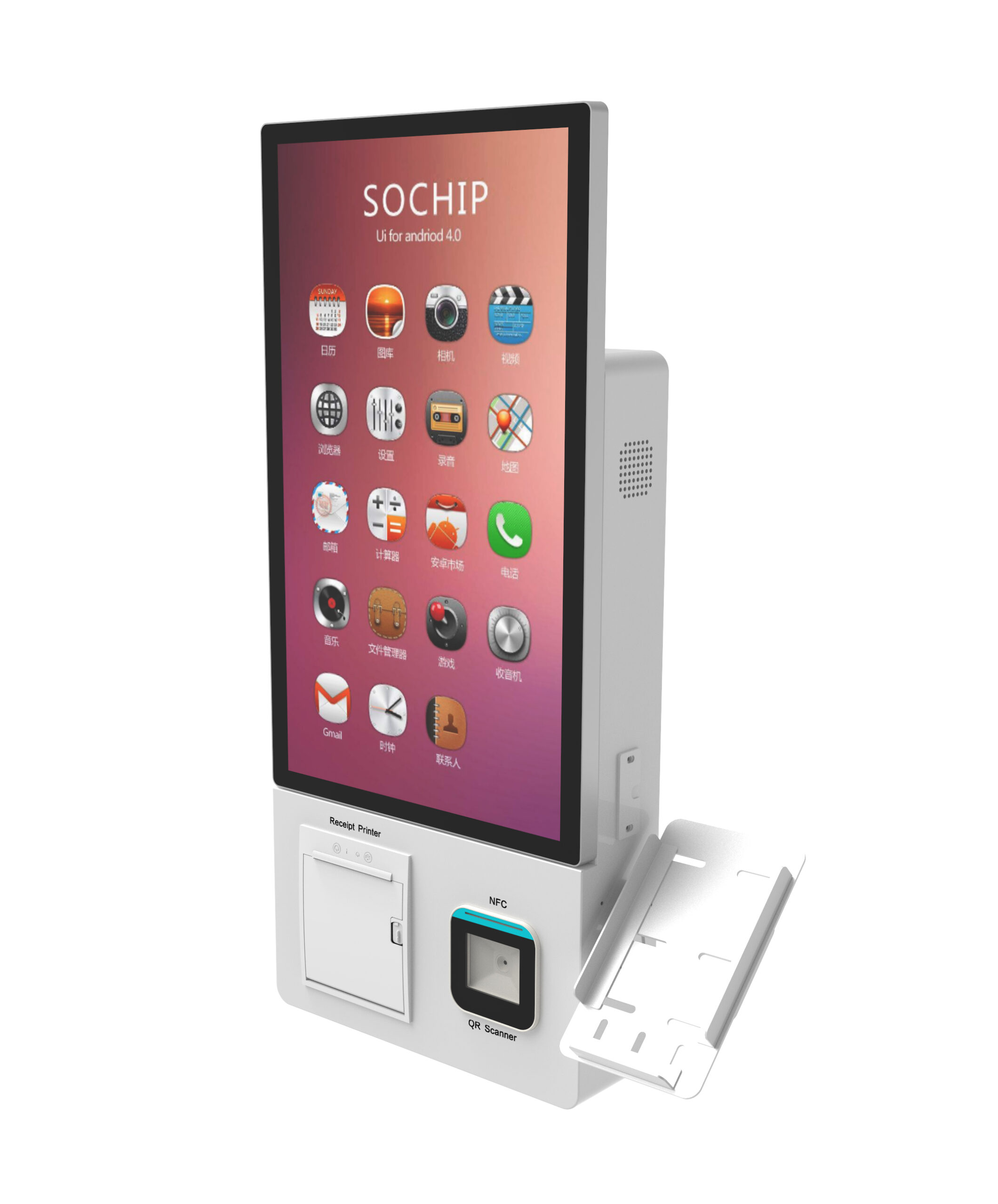
Quick answer: Choose a 15.6″–24″ slim countertop kiosk when usable counter depth, a fixed mounting point and a dedicated power/data drop already exist, and daily transaction volume is moderate. Choose a floor-standing cabinet when you need more peripheral capacity, a cash module, a larger display, or a smaller footprint per unit of screen area . Slim units trade internal volume — and therefore thermal and peripheral headroom — for placement flexibility.
Short answer: when a slim compact self-service kiosk beats a floor-standing cabinet
Choose a 15.6″–24″ slim countertop kiosk when usable counter depth, a fixed mounting point and a dedicated power/data drop already exist, and daily transaction volume is moderate. Choose a floor-standing cabinet when you need more peripheral capacity, a cash module, a larger display, or a smaller footprint per unit of screen area . Slim units trade internal volume — and therefore thermal and peripheral headroom — for placement flexibility.
Two conditions overturn that default. First, a sustained high duty cycle in a warm, dusty or grease-laden environment: a sealed slim chassis has less air volume and a shorter vent path, so heat accumulates faster. Second, any requirement for cash acceptance, recycling or dispensing hardware, which needs a secure cabinet volume that countertop enclosures rarely provide.
Everything below is written as criteria you can measure and put into an RFQ — not as product specifications. Chassis depth, thermal ratings, ingress ratings and compliance scope must be confirmed model by model.
Side-by-side: slim countertop vs floor-standing cabinet for retail
Treat this table as a decision frame, not a datasheet. Every row must be filled in by the supplier for the exact SKU you are quoting, because two “compact kiosks” from two vendors can sit in completely different enclosure classes.
| Criterion | Slim / countertop (typically 15.6″–24″) | Floor-standing cabinet |
|---|---|---|
| Typical screen diagonal | 15.6″, 21.5″, up to 24″ | 24″ and upward, portrait or landscape |
| Space consumed | Counter surface depth plus cable bend radius; no floor area | Floor area (base footprint plus stability base); no counter depth needed |
| Peripheral capacity | Usually one or two integrated items (e.g. receipt printer, card reader, barcode scanner) | Multiple bays: printer, scanner, card reader, cash acceptor/recycler, UPS, service PC |
| Thermal headroom | Lower internal air volume; vent path is short and often partially obstructed by the counter behind it | Larger internal volume allows more separation between heat sources and vents |
| Vent path | Confirm intake and exhaust faces — rear-vented units can be blocked by a backsplash or wall | Typically front-to-rear or side-to-side within the cabinet; confirm filter access |
| Service access | Often top or front panel; some models require lifting the unit off its mount | Front door with rear or side service panel; consumables usually front-facing |
| Mounting / stability | VESA or bracket fixing to counter; fixing method interacts with counter warranty and re-merchandising | Floor-anchored pedestal or levelling feet; stability verified on site |
| Relocation cost | Low — unbolt, move, re-drill | Higher — anchor removal, floor patching, re-levelling |
| Cash handling | Generally not suitable for acceptor/recycler modules | Designed for secure cash modules where the model supports them |
How to read this: hand the table to an engineering reviewer with one instruction — mark any row where the vendor has not given you a written value for the exact SKU. Unanswered rows are where rollout risk hides.
Market practice supports the split rather than resolving it: AM/PM Systems positions a modular compact kiosk specifically for smaller store formats, while Oracle lists a countertop unit as the option for areas with limited space alongside a standalone floor unit for high-traffic areas. Both describe the same trade-off — placement flexibility versus capacity. See AM/PM Systems’ kiosk overview and Oracle’s self-service kiosk form factors for how vendors frame the same choice.
Footprint sizing: how to measure a retail counter before you shortlist
A slim kiosk fails a site survey when the residual counter depth — after everything else already on that counter — is smaller than the chassis depth plus the space its cables and ventilation need. Measure the residual first, then shortlist enclosures that fit it, rather than shortlisting by screen size and hoping the counter absorbs the difference.
- Map existing occupants. Register, bagging area, customer card-tap zone, receipt printer, and any staff working space. Mark each as fixed or movable.
- Measure residual depth and width. Take the smallest usable depth at the point the kiosk will sit — not the average depth of the counter run.
- Subtract cable bend radius and service loops. Power and data cables need a minimum bend; a right-angle entry point changes the number.
- Check for raised edges, backsplash or under-counter obstructions. These can block rear vents and prevent a flush mount.
- Compare against chassis depth for the exact model. Ask for the depth including any rear cable shroud or bracket, not the bare enclosure. A small-footprint tabletop unit such as the US-K156 compact tabletop kiosk is a useful reference point when you want to test the arithmetic against a real chassis.
- Confirm reach and clearance against your own applicable requirements. Reach range, forward approach and knee/clearance dimensions vary by jurisdiction and by the accessibility standard your site applies. Verify with your compliance reviewer — do not accept a supplier’s assertion that a unit “meets ADA” without the model-level basis.
Also verify per model whether the printer paper path exits front or side, whether the scanner is integrated or a separate USB peripheral, and whether the card reader is customer-facing or staff-facing. Each answer changes both the footprint and the cable count.
Cooling and thermal headroom: where slim chassis actually fail
Slim enclosures fail in the field when sustained duty cycle plus high ambient temperature exceeds what the vent path can exhaust. The selection criterion is therefore not “does it have a fan” but “what duty cycle and ambient range will the integrator warrant this chassis for, in writing, on this SKU”.
Send these questions to every supplier on your shortlist:
- What is the rated operating ambient temperature range for the complete configured unit — not the display panel alone?
- What is the duty cycle assumption behind that rating: continuous operation, or intermittent with defined rest periods?
- Which faces are the intake and the exhaust, and what unobstructed clearance does each require?
- Is there a filter or dust-management element, how often does it need service, and can it be changed without opening the compute compartment?
- If a printer is fitted, is the paper path isolated from the compute and display airflow?
- How does the enclosure behave if the site’s HVAC fails on a peak summer day — is there a thermal throttle or shutdown behaviour, and what does it do to transactions in progress?
A sealed, display-only front-of-house screen and a vented transactional kiosk are not interchangeable in a greasy or floury environment. If the unit sits near frying or baking, grease will coat an unfiltered intake, and the cleaning routine has to include that intake or the thermal margin disappears over the life of the deployment. Ask how the enclosure is designed to be cleaned, by whom, and with what.
Do not accept a wattage, noise or temperature figure quoted verbally. Ask for it on the datasheet for the exact model and configuration you are buying, since peripherals change the thermal load.
Maintenance clearance: the criterion that kills a rollout after install
Service access direction determines your counter layout more than unit size does. Before committing to a layout, require the supplier to state which panels open, in which direction, and how much working space each needs with the kiosk installed.
Separate the three service paths, because their frequency and their clearance demands differ:
- Consumables — daily, front-of-house. Receipt paper, card reader cleaning. Must be reachable by store staff without tools and without blocking the customer queue.
- Compute and cabling — occasional, typically rear or top. USB, Ethernet, power, and any maintenance port. Needs enough space for a technician to see and reach connectors; a wall-mounted unit with no rear gap is a service trap.
- Panel or module removal — rare, but the largest clearance. If the printer, cash module or power supply can only be replaced by removing the whole enclosure, that is a different service event from opening a door, and it should be priced and planned as such.
For countertop units, add a stability and tamper note. Specify the fixing method, and confirm in writing how it interacts with the counter warranty and with re-merchandising — a bolted-down kiosk limits how the counter can be rearranged next season. Where the site requires a cash module inside a secure cabinet, work through a cash-module risk checklist before shortlisting rather than after: see the cash handling kiosk buying checklist .
One practical risk reduction: pilot a single unit on the intended counter, with the intended peripherals, for a full trading week before placing a multi-site order. It costs one unit and surfaces clearance, thermal and cleaning problems that no drawing will.
Scene-based selection rules for US retail formats
The deciding constraint varies by scene, so the recommendation should change with it. These are selection rules for shortlisting, not claims about any specific deployment.
- QSR order-and-pay beside an existing counter. Slim or countertop. Deciding constraint: residual counter depth and whether the paper path exits toward the customer. Cross-reference the restaurant kiosk sourcing spec sheet for the payment and enclosure items to verify.
- Convenience store aisle or endcap. Slim, wall- or shelf-mounted where the model supports it. Deciding constraint: aisle width and customer flow — a pedestal in a narrow aisle becomes a trip hazard.
- Hotel or clinic lobby check-in. Either, driven by aesthetics and the number of peripherals. Deciding constraint: whether identity scanning, printing and card reading must all be present, which pushes toward a cabinet.
- High-volume queue-busting near an entrance. Floor-standing. Deciding constraint: sustained duty cycle and thermal headroom, plus relocation cost if the layout changes seasonally.
- Pop-up or seasonal placement. Slim. Deciding constraint: power and data availability at the temporary location and how quickly the unit can be moved and re-anchored.
Where the debate is really about screen size rather than form factor, the sizing standard itself is covered separately — see why 15.6″–21.5″ is the default transactional kiosk envelope . This page deliberately stays on the form-factor and clearance decision.
What to put in the RFQ: verification steps, not assumed numbers
A criteria-matched RFQ is what makes two quotes comparable. Ask every supplier to answer the same list in the same order, and mark any item they leave blank as an open risk rather than an oversight.
- Chassis footprint, depth including brackets and cable shrouds, and mounting method.
- Rated operating ambient temperature range and duty cycle assumption, for the configured unit.
- Vent intake/exhaust direction and required unobstructed clearance.
- Service access: which panels open, in which direction, required working space, and whether any module replacement needs enclosure removal.
- Peripheral list with interfaces, and whether each is integrated or a separate peripheral.
- Enclosure ingress rating — confirm the level per model, not by product family.
- OS, management/remote-monitoring stack, and connectivity options; if uptime matters, review Ethernet, WiFi and cellular failover as a separate line item.
- Lead time, MOQ, spare-parts availability and field-replaceable unit list.
- Site-survey support: will the supplier review your counter measurements before confirming the model?
Items that must be confirmed for your destination and project
These cannot be settled by a generic answer, and no supplier should give you a number without checking your SKU and destination:
- Tariff classification and HS code — confirm the current classification for the exact SKU with your own customs broker, and check whether your contract allocates classification risk to the buyer or the seller. The OEM contract clause checklist for kiosk tariff cost sets out the clauses to review.
- Certification scope and marking — a factory-level certificate is not the same as model-level compliance. Request the current certificate and test report naming the exact model, and confirm the marking requirements for your market.
- Accessibility requirements — applicable reach, clearance and approach requirements depend on your jurisdiction, site type and the standard your organisation applies. Verify with your compliance reviewer.
- Payment data scope — if the kiosk accepts card payments, determine your own scope before the integrator assumes it. See PCI DSS scope for self-service kiosks .
Next step: turn the criteria into a costed comparison
Two quotes for a “compact kiosk” routinely differ because they describe different enclosure classes, different thermal ratings and different service access — not because one vendor is cheaper. A criteria-matched RFQ, answered in writing for the exact SKU, is what converts those quotes into a comparison you can defend to finance.
Send us your counter measurements, duty-cycle assumption, ambient conditions and peripheral list. Request a 2026 quote and a dual-source BOM / footprint sizing sheet — we will return a configured chassis proposal with the thermal, service-access and footprint values written out, plus a second-source BOM line for the components where dual sourcing actually reduces your risk. If tooling, IP ownership or exit terms are part of your decision, review OEM vs ODM kiosk manufacturing: tooling, IP and exit risk before you brief the quote, and raise enclosure, peripheral and MOQ scope in a single pass rather than across three rounds of email.